
📄 Summary: What You’ll Learn in This Article
The article introduces the Cost Module in Marmind, a tool designed to help marketing teams with financial planning, tracking, and analysis of their activities.
-
Location of the cost module
-
General applications of the cost module
🧑🤝🧑 Who Should Read This?
This article is most useful for:
-
Marketing Professionals, Marketing Operations Managers, Business leaders who are interested in Marmind’s features
-
New Marmind Users
✔️ Prerequisites: What Should You Know Before Getting Started?
Level: Easy
Access required: None
-
No prior knowledge is required. This is an introductory article for those exploring Marmind for the first time.
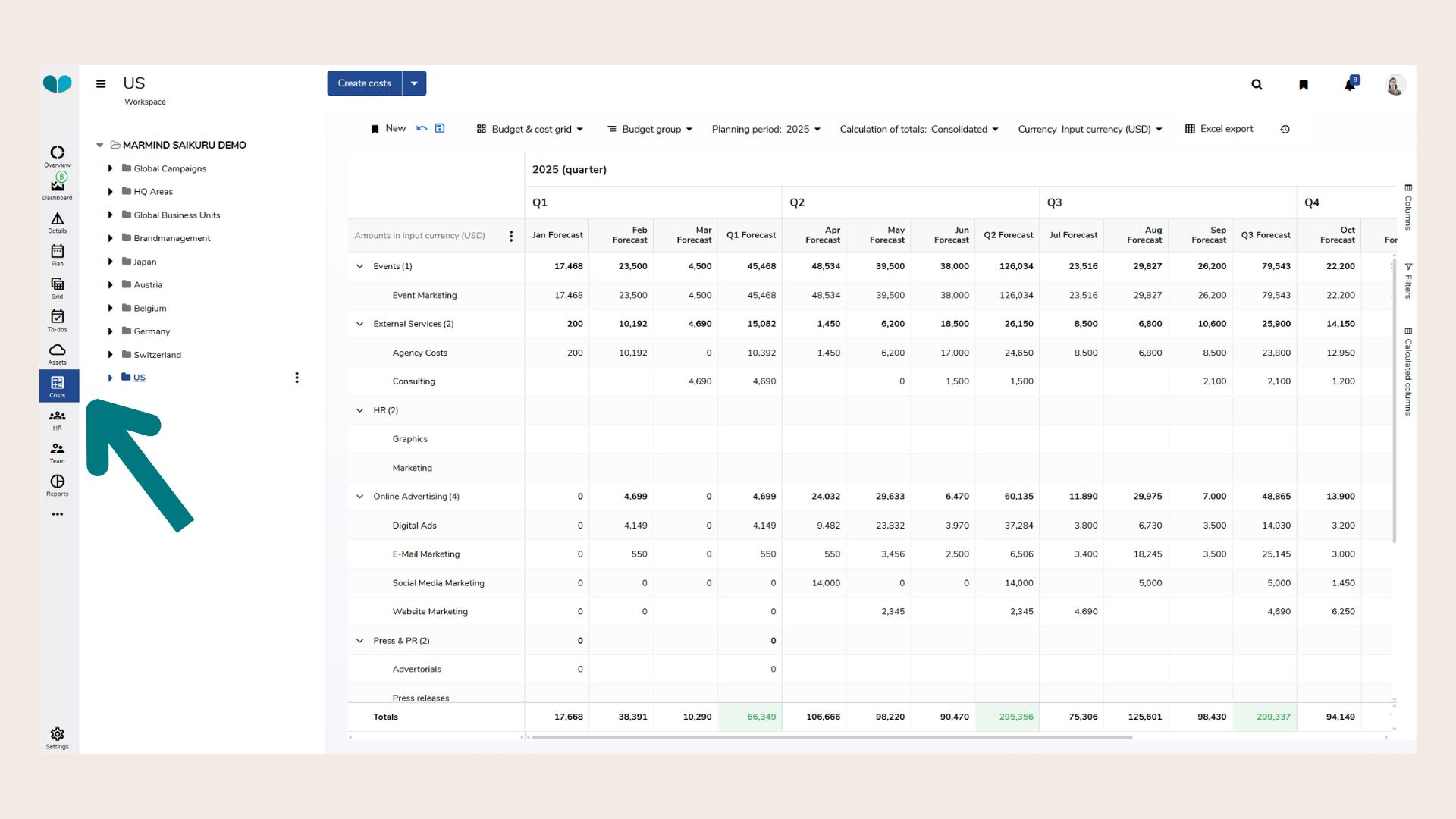
Where to find the Cost module
You can find the cost module in the module bar. In combination with clicking on an area in the navigation bar, you will be able to see an overview of the specific area immediately.
What is the Cost module generally used for?
The Cost Module in MARMIND is a powerful tool designed to support marketing teams in the financial planning, management, and analysis of marketing activities. Its core functions include:
-
Structured Budget Allocation
Enables top-down allocation of budgets from organizational levels down to individual marketing activities. Bottom-up planning is also supported for more flexible use cases. -
Forecasting and Actual Cost Tracking
Allows detailed entry and tracking of forecasted and actual costs, providing transparency across all marketing levels. -
Planned/Actuals Comparison
Facilitates comparison between planned and actual expenditures, helping teams identify budget deviations and optimize financial performance. -
Categorization and Subaccount Management
Supports the assignment of costs to budget groups and subaccounts. These can be configured in alignment with internal accounting structures or external systems such as SAP. -
Approval Workflow Integration
Integrates seamlessly with custom approval workflows, ensuring that budget releases and cost entries are reviewed and approved according to organizational policies. -
Comprehensive Financial Reporting
Offers built-in reporting tools for visualizing and analyzing costs, with support for exporting data or integrating it into dashboards. -
Audit Trail and History
Maintains a detailed history of all budget and cost changes, supporting traceability and financial governance. -
Exchange Rate Management
Enables planning and cost entry in different currencies, with flexible configuration of exchange rates for international teams. -
Role-Based Access Control
Provides granular control over who can view, edit, and approve cost-related data using customizable roles and permissions.
❓ FAQs